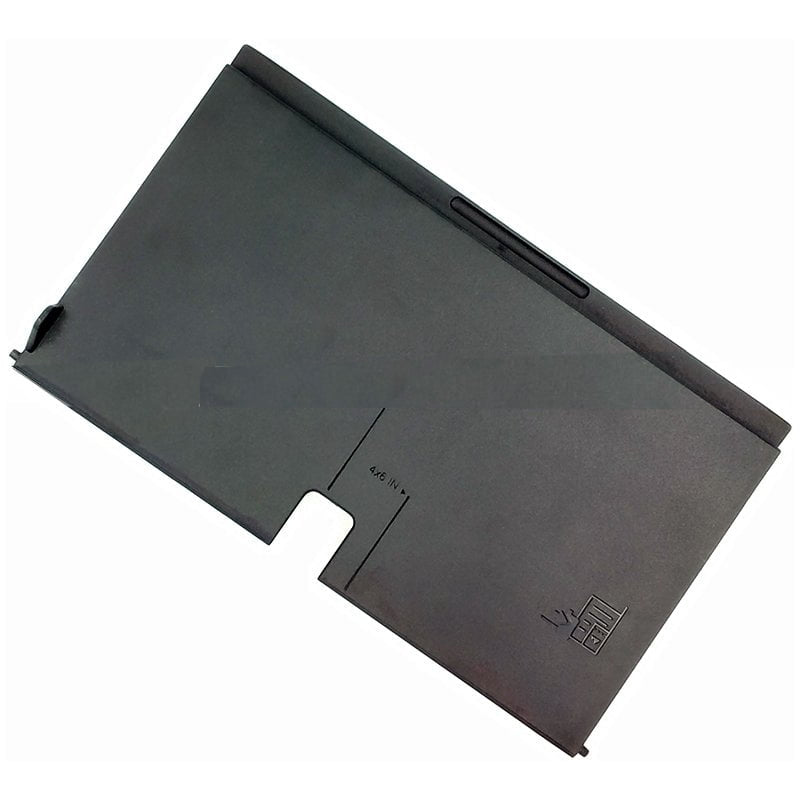
Tray & Separation Pad at Partsbaba.com – Printer Paper Feeding & Separation Parts
Explore Tray & Separation Pad at Partsbaba.com, a dedicated collection of printer pickup and paper-handling components designed for laser printers, inkjet printers, multifunction printers, and other compatible printing equipment.
Tray and separation components play an important role in controlling paper movement through the printer. A worn or damaged separation pad or roller can contribute to multiple-sheet feeding, paper jams, misfeeds, and inconsistent paper pickup. Partsbaba.com offers model-specific replacement options for printer servicing and maintenance.
Explore Tray & Separation Pad Products
The collection includes components designed for different printer paper-feed mechanisms, such as:
-
Tray Separation Pads – Help separate individual sheets from the paper stack.
-
Tray 1 Separation Pads – Replacement components for compatible Tray 1 assemblies.
-
Tray 2 Separation Pads – Designed for suitable secondary paper trays.
-
Separation Rollers – Assist with controlled paper feeding and sheet separation.
-
Pickup & Separation Components – Parts used together in compatible paper-feed systems.
-
Printer Paper-Feed Parts – Replacement components for servicing paper-handling mechanisms.
For example, Partsbaba.com lists Tray 2 separation pads for models including HP LaserJet P3015, P2035, and P2055, while a separation roller listing covers various Samsung and Xerox models.
What Does a Separation Pad Do?
A separation pad works with the printer's pickup mechanism to help separate sheets of paper from a stack. Instead of allowing multiple sheets to move through the printer at once, the separation mechanism helps control the feeding process.
A typical paper-feed process can be simplified as:
Paper Tray → Pickup Roller → Separation Pad/Roller → Paper Path → Printing Mechanism
The exact arrangement varies between printer models.
Signs of a Worn Separation Pad
A damaged or worn separation pad may contribute to paper-feed problems such as:
- Multiple sheets feeding at once
- Paper pickup failure
- Frequent paper jams
- Paper misfeeds
- Inconsistent paper feeding
- Blank pages caused by incorrect paper movement
- Paper slipping during pickup
- Feeding more than one sheet from the tray
However, paper-feed problems can also be caused by the pickup roller, paper quality, tray mechanism, sensors, gears, or other components, so inspect the complete paper-feed system before replacing a part.
Separation Pad vs Separation Roller
Both components can perform a similar paper-separation function, but their physical design and printer application can differ.
| Feature |
Separation Pad |
Separation Roller |
| Design |
Pad/friction surface |
Rotating roller |
| Movement |
Usually stationary |
Rotates with mechanism |
| Main Function |
Helps separate sheets |
Controls sheet separation |
| Application |
Depends on printer design |
Depends on printer design |
| Replacement |
Model-specific |
Model-specific |
Some printer mechanisms use a separation pad, while others use a separation roller or pad roller. Always match the original component.
How to Choose the Right Tray & Separation Pad?
Printer paper-feed components are highly model-specific. Check the following before ordering:
1. Printer Model
Start by confirming the exact printer model.
For example, Partsbaba lists a Tray 2 separation pad specifically for HP LaserJet P3015, while another listing is designed for HP LaserJet P2035 and P2055.
2. Tray Number
Check whether the component is designed for:
- Tray 1
- Tray 2
- Manual feed
- Multipurpose tray
- Other specified paper tray
3. Part Number
If the original component has a part number, compare it with the replacement listing.
4. Dimensions
Compare:
- Length
- Width
- Thickness
- Diameter, for rollers
- Mounting dimensions
5. Shape & Mounting
The replacement should match the original component's shape, mounting arrangement, and contact surface.
6. Printer Compatibility
Always verify the compatible printer models listed on the individual product page.
Tray & Separation Pad Selection Guide
| Specification |
What to Check |
| Printer Model |
Exact compatible model |
| Tray |
Tray 1, Tray 2, etc. |
| Part Type |
Pad or roller |
| Part Number |
Match original where available |
| Dimensions |
Compare original component |
| Mounting |
Match holder/assembly |
| Material |
Suitable friction surface |
| Application |
Paper pickup/separation |
Printer Paper Feeding Problems
Different paper-feed symptoms can point toward different components.
| Problem |
Components to Inspect |
| Multiple Sheets Feed |
Separation Pad / Roller |
| Paper Does Not Pick Up |
Pickup Roller / Tray Mechanism |
| Frequent Paper Jams |
Rollers / Pads / Gears |
| Paper Slips |
Pickup & Separation Components |
| Uneven Feeding |
Rollers / Pads / Alignment |
| Noisy Paper Feeding |
Gears / Rollers / Drive Mechanism |
A complete inspection is recommended before replacing a component because more than one part may contribute to the same symptom.
Tray & Separation Pad for Printer Repair
These components are particularly useful for:
- Printer repair shops
- Service centres
- Printer technicians
- Maintenance professionals
- Refurbishment businesses
- Printer resellers
- DIY printer repair
Replacing a worn paper-feed component can be a practical alternative to replacing an entire printer when the rest of the equipment remains functional.
Installation & Maintenance Tips
When replacing a tray separation pad or roller:
- Turn off and disconnect the printer before servicing.
- Remove the paper tray according to the printer's service procedure.
- Inspect the existing pickup and separation components.
- Compare the replacement with the original.
- Check the mounting position and orientation.
- Clean accumulated paper dust where appropriate.
- Install the replacement securely.
- Reassemble the tray correctly.
- Load suitable paper without exceeding the tray capacity.
- Test paper feeding with a few sheets before normal operation.
Avoid applying lubricant to friction surfaces unless specifically recommended for that component.
Why Choose Tray & Separation Pad Parts from Partsbaba.com?
- Dedicated collection for printer pickup and paper-separation parts
- Model-specific replacement options
- Separation pads and rollers for compatible printers
- Useful for printer servicing and maintenance
- Suitable for technicians and repair centres
- Options for different printer brands and models
- Related printer parts available in one place
Explore Related Collections at Partsbaba.com
Find additional products for printer repair and paper handling:
Frequently Asked Questions
What is a printer separation pad?
A separation pad is a paper-feed component that helps separate individual sheets from a stack and reduce multiple-sheet feeding.
What causes a printer to pick up multiple sheets?
A worn separation pad or separation roller can contribute to multiple-sheet feeding. Pickup rollers, paper condition, tray mechanisms, and other components can also be responsible.
Are separation pads universal?
No. Separation pads are generally model-specific. Dimensions, mounting design, material, and tray configuration can vary between printers.
How do I find the correct separation pad?
Check the printer model, tray number, original part number, dimensions, shape, and compatibility information provided with the replacement product.
Is a separation pad the same as a pickup roller?
No. A pickup roller helps pull paper from the tray, while a separation pad or roller helps control and separate the sheets. Both work together in many printer paper-feed systems.
Shop Tray & Separation Pad at Partsbaba.com
Find Tray Separation Pads, Separation Rollers, and printer paper-feed components at Partsbaba.com for compatible laser printers, inkjet printers, and multifunction printers.
Explore Tray & Separation Pad at Partsbaba.com and find the right paper-feed replacement part for your printer repair and maintenance needs.


 Printer Parts
 Cables
 IT Accessories
 Laptop Parts
 Toner Parts
 Tools
Tools
 Drone Parts