COD Above ₹200
Get 5% Discount On First Order
Free Shipping on order above Rs. 1000
COD Above ₹200
Get 5% Discount On First Order
Free Shipping on order above Rs. 1000
COD Above ₹200
Get 5% Discount On First Order
Free Shipping on order above Rs. 1000
COD Above ₹200
Get 5% Discount On First Order
Free Shipping on order above Rs. 1000
COD Above ₹200
Get 5% Discount On First Order
Free Shipping on order above Rs. 1000
COD Above ₹200
Get 5% Discount On First Order
Free Shipping on order above Rs. 1000
COD Above ₹200
Get 5% Discount On First Order
Free Shipping on order above Rs. 1000
COD Above ₹200
Get 5% Discount On First Order
Free Shipping on order above Rs. 1000
COD Above ₹200
Get 5% Discount On First Order
Free Shipping on order above Rs. 1000
COD Above ₹200
Get 5% Discount On First Order
Free Shipping on order above Rs. 1000
COD Above ₹200
Get 5% Discount On First Order
Free Shipping on order above Rs. 1000
COD Above ₹200
Get 5% Discount On First Order
Free Shipping on order above Rs. 1000
COD Above ₹200
Get 5% Discount On First Order
Free Shipping on order above Rs. 1000
COD Above ₹200
Get 5% Discount On First Order
Free Shipping on order above Rs. 1000
COD Above ₹200
Get 5% Discount On First Order
Free Shipping on order above Rs. 1000
COD Above ₹200
Get 5% Discount On First Order
Free Shipping on order above Rs. 1000
COD Above ₹200
Get 5% Discount On First Order
Free Shipping on order above Rs. 1000
COD Above ₹200
Get 5% Discount On First Order
Free Shipping on order above Rs. 1000
COD Above ₹200
Get 5% Discount On First Order
Free Shipping on order above Rs. 1000
COD Above ₹200
Get 5% Discount On First Order
Free Shipping on order above Rs. 1000


- All categories
- Cables
- Components
- Connector
- Drone Parts
- Laptop Parts
- Printer Parts
- Repairing Tools
- film
Main menu
-
All Categories
- All Categories
-
 Printer Parts
-
 Cables
-
 IT Accessories
-
 Laptop Parts
-
 Toner Parts
-
 Tools
Tools
-
 Drone Parts
-
Components
- Components
-
Cap and Knob
-
Prototyping & Testing
-
Power Supplies
-
Circuit Protection
-
LEDs and Display
-
Passive Component
-
Active Component
-
Embedded Solutions
-
Switches
-
Connectors
- Connectors
- Audio & Video Connector
- Battery Holder
- Berg 2.5mm
- Board to Board
- D-Sub
- FFC/FPC
- FRC/IDC
- GX Circular
- Header Strips
- IC & Card Sockets
- JST Connectors
- Modular Connectors
- PCB Power Connectors
- AC/DC Power Connectors
- RF Antenna
- SATA Connector
- USB Connectors
- Waterproof Connectors
- Wire Terminal Connectors
-
Hardware
-
Drone Parts
- Drone Parts
-
Drone Parts
-
Drone Boards
-
Drone Accessories
-
Cables
- Cables
-
Computer Cables
-
Data Networking Cables
-
Flat Cable
-
Printer Parts
- Printer Parts
-
Pickup Parts
-
InkJet Parts
-
Fuser Parts
-
Printer Supplies
-
Toner Parts
-
Tools


Your cart
Laptop Hinges
15 products
15 products
Sort by:
- Featured
- Most relevant
- Best selling
- Alphabetically, A-Z
- Alphabetically, Z-A
- Price, low to high
- Price, high to low
- Date, old to new
- Date, new to old

₹ 684.00
These laptop hinges for the Dell Latitude E5530 are designed to restore smooth and reliable screen movement, ensuring long-lasting durability. Engineered specifically for the Latitude E5530 model, this left and right hinge set provides secure support for your laptop display. Whether you're replacing worn-out hinges or upgrading your laptop’s functionality, these components offer precise fit and compatibility for seamless installation and optimal performance.
- Left and right hinge set tailored to the Dell Latitude E5530 for perfect compatibility
- Durable construction guarantees stable screen positioning and extended lifespan
- Facilitates smooth opening and closing motions to prevent display wobble
- Easy to install for effective laptop screen repair or maintenance
- Restores original hinge tension to enhance everyday laptop usability
- Essential replacement part to maintain the structural integrity of your laptop screen


₹ 1,499.00
These high-quality internal L+R hinges are designed specifically for the Asus ROG Strix G531 / G531G series laptops. Built for durability and precision, they ensure smooth screen opening and closing, restoring proper screen stability and alignment. Ideal for hinge replacement during laptop repair or refurbishment, this set is fully compatible with the specified model and part number 13NR01N0M08011.
| Section | Details |
|---|---|
| Part Number | 13NR01N0M08011 |
| Compatible Brand | ASUS |
| Compatible Model Series | ROG Strix G531 / G531G |
| Product Type | Laptop Internal Hinges (Left + Right Set) |
| Quality / Condition | New |
| Installation Area | Laptop Screen Hinges |

₹ 630.00
These laptop hinges are designed specifically for the HP 15-AB series, providing reliable support and smooth movement for your laptop screen. Crafted as a left and right set, they offer a secure fit to help maintain screen stability and prevent wobbling during use. Ideal for repairing or replacing worn hinges, these components ensure your laptop screen remains firmly positioned for everyday tasks.
- Precision-engineered for HP 15-AB models to guarantee perfect alignment and compatibility.
- Durable construction ensures long-lasting performance and resistance to wear over time.
- Designed to eliminate screen wobble and maintain a steady viewing angle.
- Includes both left and right hinges for complete screen support.
- Ideal for easy replacement during laptop repair or maintenance.
- Helps restore your laptop’s original screen movement fluidity.

₹ 684.00
These laptop hinges are designed specifically for the Dell Latitude E5520, offering a reliable solution to fix loose or broken screen hinges. Crafted to restore smooth opening and closing functionality, this left and right set ensures your laptop screen stays firmly in place. Ideal for repairing damaged laptops, these hinges maintain device stability and prolong screen lifespan while seamlessly fitting the original design.
- Precision-engineered to match Dell Latitude E5520 specifications for exact fit and function
- Durable construction provides long-lasting support to prevent screen wobble and damage
- Complete left and right hinge set enables full replacement for balanced screen operation
- Easy installation designed for straightforward repair without requiring special tools
- Restores original screen stability ensuring reliable laptop use and comfort
- Compatible exclusively with Dell Latitude E5520 to guarantee proper alignment and performance
₹ 684.00
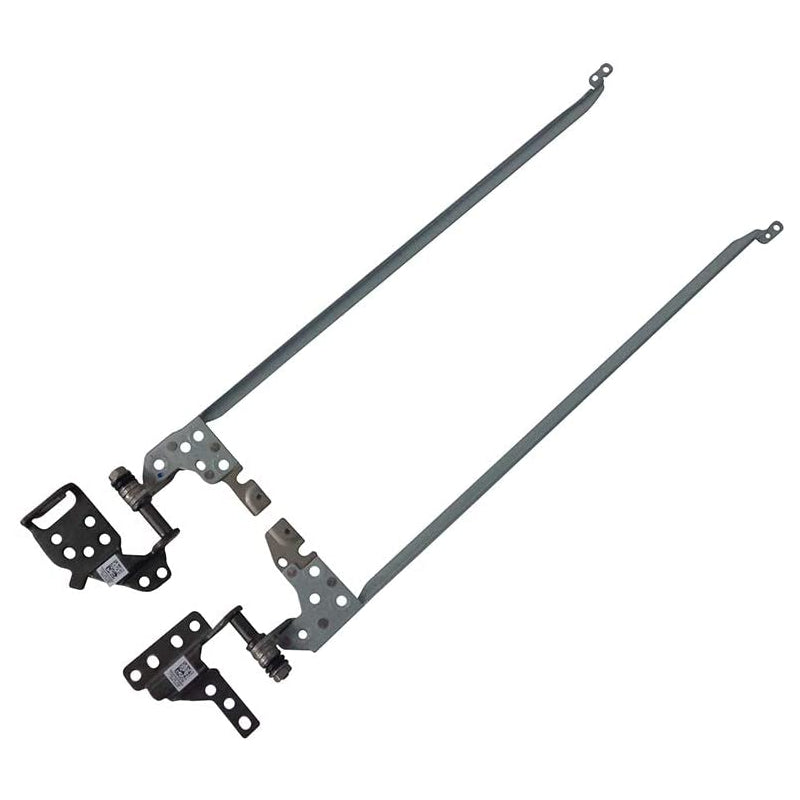
These Laptop Hinges are designed specifically for the Acer Aspire A515 series, providing a reliable replacement to maintain your laptop’s screen stability. Crafted to prevent screen wobbling and misalignment caused by damaged hinges, this left and right set ensures smooth opening and closing of your laptop. Compatible exclusively with the Acer Aspire A515, these hinges restore the device’s functionality for everyday use, enhancing durability and user experience.
- Precision fit for Acer Aspire A515 guarantees hassle-free installation and optimal performance.
- Durable metal construction offers long-lasting support to prevent screen misalignment.
- Complete left and right hinge set covers both sides for balanced screen movement.
- Restores smooth laptop lid operation for consistent and reliable opening and closing.
- Essential for repairing cracked or broken hinges to extend your laptop's lifespan.
- Maintains proper screen alignment to avoid display issues and improve viewing comfort.
- Compatible solely with Acer Aspire A515 models ensuring exact match and function.

₹ 364.00
These laptop hinges are designed specifically for the HP Pavilion G6-2000 series, including models 2002XX, 2010NR, and 2031N. They provide smooth and stable screen movement, ensuring your display stays securely positioned during use. Crafted to match original specifications, this left and right set restores the laptop's hinge functionality, making it ideal for repairing or refurbishing your HP Pavilion G6 laptop.
- Precise fit for HP Pavilion G6-2000 series ensures seamless replacement without modification
- Durable construction restores reliable screen support and movement
- Left and right hinges included for complete display stability
- Easy installation helps return your laptop to optimal condition quickly
- Compatible with multiple G6-2000 variants covering 2002XX, 2010NR, and 2031N models
- Maintains original laptop performance preserving screen alignment and usability

₹ 456.00
These Laptop Hinges for Lenovo IP320-15 (L/R Set) are designed to restore the smooth and secure movement of your laptop screen. Perfectly compatible with the Lenovo IP320-15 model, these hinges provide reliable support for opening and closing the display. Crafted to ensure durability, they are essential for maintaining the proper alignment and stability of your laptop screen during daily use.
- Precision-engineered hinges crafted specifically for the Lenovo IP320-15 ensure perfect fit and function.
- Durable construction guarantees long-lasting performance and consistent screen support over time.
- Facilitates smooth screen movement allowing effortless adjustment without wobbling or looseness.
- Complete left and right set included to replace both sides for balanced stability.
- Ideal replacement part for repairing broken or worn-out hinges and restoring laptop usability.
- Helps maintain optimal screen alignment, preventing damage and improving overall laptop lifespan.

₹ 684.00
These laptop hinges are designed exclusively for the IBM ThinkPad Lenovo T420, providing reliable support for your device’s display. Crafted as a left and right set, they ensure smooth opening and closing of your laptop screen. Built to restore the original functionality and stability, these hinges are essential for maintaining your laptop’s durability and usability.
- Precision-engineered to fit Lenovo ThinkPad T420 models perfectly, guaranteeing seamless installation.
- Enhances the opening and closing mechanism for improved screen movement and less wear over time.
- Durable construction that supports the laptop display firmly, preventing wobbling and misalignment.
- Complete left and right hinge set ensures uniform balance and reliable performance.
- Ideal replacement for worn or broken hinges to extend the lifespan of your laptop.
- Maintains the original look and feel of your ThinkPad by matching factory specifications.

₹ 684.00
These laptop hinges for HP 15D models provide reliable left and right support designed to maintain your screen’s stability and smooth motion. Crafted from robust metal materials, they ensure durability and ease of installation, making them an ideal replacement for worn or damaged hinges. Compatible specifically with HP 15D laptops, these hinges restore the original functionality of your device for everyday use and travel convenience.
- Precision-engineered metal construction delivers lasting strength and resistance to wear.
- Left and right hinge set designed to perfectly fit HP 15D laptop models.
- Ensures smooth screen movement for effortless opening and closing.
- Easy installation process allows quick replacement without professional help.
- Restores structural integrity to prevent screen wobbling and damage.
- Optimized for daily laptop use including work, study, and travel needs.

₹ 684.00
These laptop hinges are designed specifically for the Lenovo G570 model, providing a reliable solution to repair and reinforce the screen hinges. Crafted to restore proper screen positioning and enhance durability, this left and right hinge set ensures smooth opening and closing of your laptop display. Ideal for anyone looking to extend the lifespan of their Lenovo G570, these replacement parts are essential for maintaining optimal laptop functionality.
- Precision fit for Lenovo G570 ensures seamless compatibility and easy installation.
- Reinforces screen hinges to prevent wobbling and improve display stability.
- Durable construction enhances the strength and longevity of your laptop’s hinge mechanism.
- Includes both left and right hinges to fully restore screen movement.
- Ideal for repairing broken or loose hinges without replacing the entire laptop lid.
- Keeps your laptop display aligned for a better viewing experience.

₹ 456.00
These Laptop Hinges for HCL P28 (L/R Set) are designed to replace worn or damaged hinges, restoring smooth and reliable screen movement. Perfectly compatible with HCL P28 laptops, these hinges ensure your screen stays securely in place while offering effortless adjustment. Crafted for durability and precision, they help maintain your device's original performance and extend its lifespan.
- Exact fit for HCL P28 laptops, guaranteeing seamless replacement and compatibility.
- Durable construction ensures long-lasting support for screen adjustments.
- Left and right set covers both hinge sides for complete repair solutions.
- Restores smooth screen movement for comfortable viewing angles and stability.
- Easy to install with standard tools, making it suitable for DIY repairs.
- Cost-effective alternative to full laptop screen or chassis replacement.

₹ 684.00
These Laptop Hinges are designed specifically for the Acer Aspire ES-571, providing a reliable solution to restore smooth and stable screen movement. Crafted as a left and right set, they ensure proper alignment and durability for your laptop's display. Ideal for users seeking to repair or replace worn or broken hinges, this set maintains the original fit and functionality, extending the lifespan of your device with precision-crafted components.
- Perfect fit for Acer Aspire ES-571, ensuring seamless compatibility and easy installation
- Restores precise screen positioning to prevent wobbling and improve overall stability
- Durable construction designed to withstand regular opening and closing cycles
- Includes both left and right hinges for comprehensive repair in one purchase
- Helps avoid costly replacements by extending the life of your existing laptop
- Ideal for DIY repairs or professional refurbishing of Acer Aspire ES-571 laptops

₹ 569.00
These replacement laptop hinges are designed specifically for the Acer Aspire E1-570, ensuring a secure fit and restoring the stability of your screen. Crafted to prevent wobbling, this left and right hinge set enhances the durability and functionality of your laptop’s display. Ideal for repairing worn or damaged hinges, they help maintain smooth opening and closing motions while supporting your screen firmly in place.
- Precisely engineered for Acer Aspire E1-570 to guarantee compatibility and ease of installation.
- Left and right hinge set replaces both sides for balanced support and consistent performance.
- Prevents screen wobble, improving display stability and user comfort during use.
- Durable metal construction ensures long-lasting reliability under regular laptop opening and closing.
- Restores smooth hinge movement for effortless adjustment of the laptop screen angle.
- Essential for laptop repairs that require restoring original screen alignment and hinge strength.
- Compatible with laptop parts standards for hassle-free replacement without modifications.

₹ 551.00
These replacement laptop hinges are designed specifically for the Acer Aspire 4730, ensuring a precise fit and reliable screen support. Crafted to restore the smooth opening and closing function of your laptop screen, this left and right hinge set helps maintain durability and stability. Ideal for users looking to repair or refurbish their Acer Aspire 4730, these hinges deliver consistent performance and compatibility with the original design.
- Exact fit for Acer Aspire 4730 guarantees straightforward installation and seamless operation
- Durable construction supports screen stability and extends laptop lifespan
- Complete left and right set ensures balanced screen movement and uniform support
- Restores original screen functionality by replacing worn or broken hinges
- Compatible with Acer Aspire 4730 models to maintain device integrity and performance
- Helps prevent further damage by securing the display firmly in place

₹ 684.00
These Laptop Hinges for HP ProBook 440 G2 (L/R Set) are designed to replace worn or damaged hinges, restoring screen stability and smooth movement. Crafted specifically for the HP ProBook 440 G2, this set ensures precise fit and reliable durability. Ideal for repairing laptops with loose or broken hinges, these components help maintain your device’s functionality and extend its lifespan.
- Perfectly compatible with HP ProBook 440 G2 for easy installation and exact alignment
- Durable metal construction provides long-lasting support for your laptop screen
- Left and right hinge set included to fully restore screen stability
- Restores smooth opening and closing movement for reliable everyday use
- Essential replacement part for laptops suffering from hinge wear or damage
- Maintains proper screen positioning to prevent wobbling during use
Explore Related Collections


Description
Laptop Hinges at Partsbaba.com – Replacement Hinges for Laptop Screen Repair
Explore Laptop Hinges at Partsbaba.com, a collection of replacement components designed to provide smooth and secure movement between a laptop's display assembly and base.
Laptop hinges are essential mechanical parts that allow the screen to open and close while maintaining its position. Over time, hinges can become stiff, loose, bent, or damaged, potentially affecting the laptop's display assembly and surrounding components.
Whether you're a laptop repair technician, service professional, reseller, or DIY user, selecting the correct hinge for the exact laptop model is essential for a proper fit and reliable operation.
Explore Laptop Hinges
The Laptop Hinges collection can include replacement hinges for different laptop models and configurations, such as:
- Left Laptop Hinges
- Right Laptop Hinges
- Laptop Hinge Sets
- Display Hinges
- LCD Hinges
- Screen Hinges
- Notebook Hinges
- Replacement Laptop Hinges
- Hinge Brackets
- Hinge Mounting Components
- Model-Specific Laptop Hinges
Compatibility Tip: Always check the exact laptop model, hinge side, mounting-hole pattern, dimensions, and original hinge part number before purchasing.
What Is a Laptop Hinge?
A laptop hinge is a mechanical component that connects the display assembly to the laptop's base.
It allows the screen to:
- Open
- Close
- Stay at different viewing angles
- Maintain structural support
- Move smoothly between positions
A simplified laptop display structure is:
Laptop Base → Hinge → Display Assembly
Most laptops use two hinges, typically positioned on the left and right sides of the display.
Why Are Laptop Hinges Important?
Laptop hinges provide both movement and structural support.
A properly functioning hinge helps:
- Hold the screen securely
- Maintain the selected viewing angle
- Allow smooth opening and closing
- Protect internal display cables
- Reduce movement of the display assembly
- Keep the screen aligned with the laptop base
A damaged hinge can place additional stress on the display housing, mounting points, bezel, and display cables.
Signs of a Damaged Laptop Hinge
Common signs include:
- Screen feels loose
- Hinge is unusually stiff
- Display does not stay in position
- Cracking or clicking sounds when opening
- Screen assembly becomes misaligned
- Laptop body separates near the hinge
- Hinge bracket is bent
- Display bezel or casing starts opening
- Opening the laptop requires excessive force
If the hinge is damaged, continuing to force the screen open or closed can cause additional damage.
Types of Laptop Hinges
Left and Right Hinges
Many laptops use separate left and right hinge assemblies.
When ordering a replacement, confirm whether you need:
- Left hinge
- Right hinge
- Pair/set
The left and right components may not be interchangeable.
Hinge Sets
Some laptop models use matching hinge sets containing both sides.
This can be convenient when both hinges show wear or damage.
Display Hinges
Display hinges are designed specifically for supporting and moving the laptop's screen assembly.
Their shape and mounting points can vary significantly between models.
How to Choose the Right Laptop Hinge?
1. Identify the Exact Laptop Model
Start with the full laptop model number.
Laptop series can contain multiple generations and configurations, and their hinges may be different.
2. Check the Hinge Side
Determine whether you require:
- Left
- Right
- Both
3. Compare the Original Hinge
If possible, compare the replacement with the original hinge.
Check:
- Shape
- Dimensions
- Mounting holes
- Brackets
- Screw positions
- Cable clearance
- Hinge orientation
4. Check the Part Number
The original hinge may have a printed or stamped part number.
Matching this number can help identify the correct replacement.
5. Check the Mounting Pattern
The screw-hole arrangement must match the laptop chassis and display assembly.
6. Check Hinge Resistance
The hinge must provide the appropriate resistance for the laptop display. A hinge that is too tight can put excessive stress on the display housing and mounting points.
Laptop Hinge Specifications
| Specification | What to Check |
|---|---|
| Laptop Model | Exact model compatibility |
| Hinge Side | Left / Right |
| Part Number | Original hinge reference |
| Dimensions | Physical size |
| Mounting Holes | Hole pattern |
| Orientation | Correct installation direction |
| Hinge Resistance | Appropriate opening force |
| Material | Construction and durability |
| Quantity | Single hinge or pair |
Laptop Hinge Replacement
Replacing a laptop hinge generally requires partial disassembly of the laptop.
A typical process may involve:
Step 1: Shut Down the Laptop
Turn off the laptop and disconnect the charger.
Step 2: Disconnect the Battery
Where serviceable, disconnect the internal battery before working around the display assembly.
Step 3: Remove the Display Bezel or Cover
Carefully remove the components required to access the hinge assembly.
Step 4: Access the Hinge Mounting Screws
Locate the screws securing the hinge to the display and/or laptop base.
Step 5: Remove the Damaged Hinge
Support the display while removing the hinge hardware.
Step 6: Install the Replacement
Position the new hinge according to the original mounting configuration.
Step 7: Check Display Movement
Before completely reassembling the laptop, carefully check that the display opens and closes smoothly.
Step 8: Reassemble the Laptop
Secure all components and confirm that the display housing is properly aligned.
Important: Laptop designs vary significantly. If the hinge has damaged the display housing, mounting inserts, or cables, replacing the hinge alone may not resolve the problem.
Laptop Hinge Damage & Display Cables
Laptop hinges are located near display cables that pass between the screen and motherboard.
A damaged or misaligned hinge can potentially place stress on these cables.
Possible symptoms of cable-related problems include:
- Flickering display
- Display turning off at certain angles
- Lines on the screen
- Camera or microphone problems
- Wireless antenna issues
For this reason, inspect nearby cables whenever a hinge is replaced.
Common Laptop Hinge Problems
| Problem | Possible Cause |
|---|---|
| Hinge Too Tight | Mechanical wear or damaged hinge |
| Hinge Too Loose | Worn hinge mechanism |
| Screen Wobbles | Loose or damaged hinge |
| Cracking Around Hinge | Damaged mounting point |
| Screen Misalignment | Bent hinge or mounting bracket |
| Hinge Cannot Be Screwed In | Damaged chassis mounting point |
| Display Cable Issues | Cable stressed near hinge |
Laptop Hinges vs Laptop Hinge Covers
A laptop hinge provides the mechanical movement and support.
A hinge cover or cosmetic cover may simply conceal and protect the hinge area.
These are different components and should not be confused when ordering replacement parts.
Laptop Hinge Maintenance Tips
To reduce unnecessary hinge stress:
- Open the laptop from the centre when practical.
- Avoid forcing a stiff hinge.
- Do not repeatedly open the display beyond its designed range.
- Keep the hinge area free from obstructions.
- Address unusual clicking or resistance early.
- Avoid carrying the laptop by its screen.
- Inspect loose mounting screws before the damage spreads.
Laptop Hinges for Repair Professionals
For laptop repair shops and technicians, accurate model identification is particularly important.
Before ordering replacement hinges, record:
Brand + Exact Model + Hinge Side + Part Number
Where possible, compare the original component with product photographs and dimensions.
Why Choose Laptop Hinges from Partsbaba.com?
- Replacement components for laptop repair
- Model-specific hinge options
- Useful for damaged or worn laptop hinges
- Suitable for repair technicians and service professionals
- Options for left, right, and hinge sets
- Related laptop repair components available
- Convenient online sourcing from Partsbaba.com
Explore Related Collections at Partsbaba.com
Find more laptop and electronics repair products:
- Laptop Accessories – Explore laptop-related accessories.
- Laptop Batteries – Find replacement laptop batteries.
- Laptop Adapters – Browse laptop power adapters.
- IT Accessories – Find computer and technology accessories.
- Repairing Tools – Explore tools for laptop and electronics repair.
- Screwdriver – Find screwdrivers for disassembly and repair.
- Hinge, Lever & Sensor – Browse related hinge and sensor components.
- Gears – Explore mechanical replacement components.
Frequently Asked Questions
What does a laptop hinge do?
A laptop hinge connects the display to the base and allows the screen to open, close, and remain at different viewing angles.
How do I find the correct laptop hinge?
Identify the exact laptop model, hinge side, original part number, mounting-hole pattern, dimensions, and physical design.
Can left and right laptop hinges be interchanged?
Usually not. Left and right hinges can have different shapes, mounting points, and orientations.
Can I replace only one laptop hinge?
In many cases, yes, if only one hinge is damaged and the replacement is compatible. However, inspect both hinges and their mounting points before deciding.
Why is my laptop hinge very stiff?
A stiff hinge may be caused by mechanical wear, damage, corrosion, or a problem with the hinge mechanism or mounting structure. Avoid forcing the display.
Can a damaged hinge damage the laptop screen?
Yes. A damaged or excessively tight hinge can place stress on the display housing, mounting points, and nearby cables.
Shop Laptop Hinges at Partsbaba.com
Find Laptop Hinges at Partsbaba.com for laptop repairs, hinge replacement, display assembly maintenance, and restoring smooth screen movement.
Explore Laptop Hinges at Partsbaba.com and find the right replacement hinge for your laptop model.
- Choosing a selection results in a full page refresh.
- Opens in a new window.